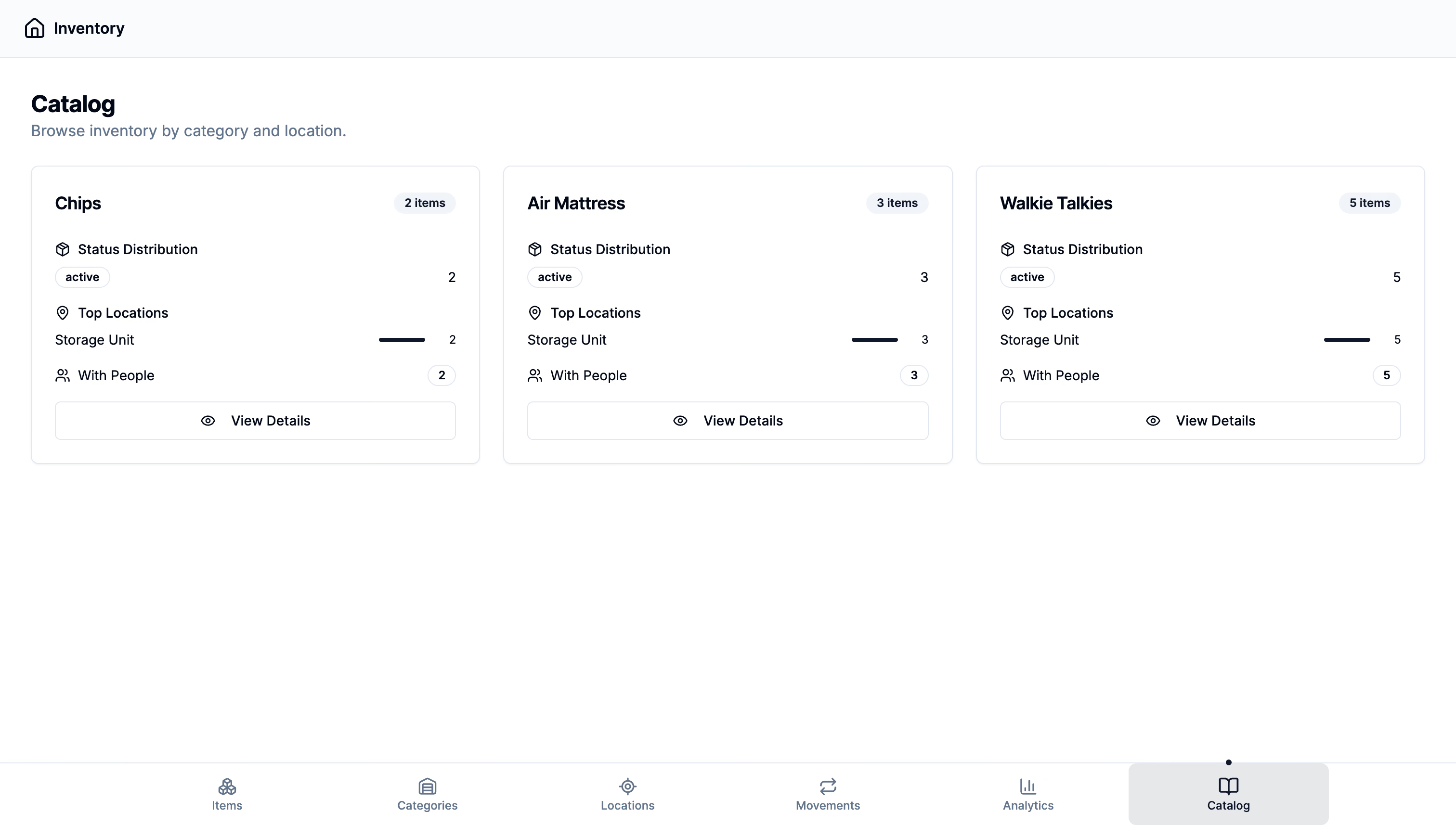
Picture this: It's 11:47 PM on a Tuesday, and I'm watching our finance team filling out their 23rd university reimbursement form of the week. Each form has 47 fields, including gems like "Object Code" (what even is that?) and "Fund Source Authorization" (your guess is as good as mine). Meanwhile, there are 104 more reimbursement requests sitting in our Google Form responses, each one requiring this same manual PDF torture.
The real kicker? Half these requests are for duplicates or submissions that are not valid, but each one still needs the full bureaucratic treatment. They were spending more time on paperwork than the actual expense cost.
That's when I decided to automate the whole mess. Here's how I built a system that turns reimbursement chaos into a one-click operation, and why sometimes the best code solves the most boring problems.
The Problem: 127 Forms, 47 Fields Each
HackPSU runs on expenses. Lots of them. We're talking about expenses covering everything from the huge pizza orders to a packet of spoons during runs to Sam's Club. Each expense, no matter how small, needs to go through our university's reimbursement system to get paid back. And that means filling out a PDF form, printing it, scanning it, and emailing it to the finance office.
Here's the workflow that was slowly killing us:
Organizer submits request via Google Form (easy enough)
Finance team reviews in a sprawling Google Sheet with 80+ expense categories
If approved, someone manually fills out a university PDF form (47 fields, I counted)
Print, scan, email the PDF along with receipts to the finance office
Pray nothing gets lost in the bureaucratic shuffle
The real problem? That step 3. Each PDF form took 10-15 minutes to fill out manually. With almost a hundred requests from our spring event, that's over 20 hours of copying data from one place to another.
Drag to pan · Arrow keys to move
Loading diagram…
The old workflow with manual bottlenecks highlighted
The breaking point came we had a backlog of 104 reimbursement requests, and we were staring down the barrel of another 20-hour manual data entry marathon. I knew there had to be a better way.
Building the Automated Solution
I decided to solve this with a full-stack application that could handle the entire reimbursement lifecycle. The key insight: automate the tedious stuff, streamline the human decisions.
Core Requirements:
Real-time submission and tracking (no more Google Sheets)
Automatic PDF generation (bye bye, manual form filling)
Email automation (notifications without human intervention)
Receipt management (upload once, use everywhere)
Analytics dashboard (because data is beautiful)
Tech Stack Decisions
We built this on our existing HackPSU platform to seamlessly integrate with our other systems. Here’s the stack we chose:
Frontend: Next.js 15 + TypeScript
App Router for clean file-based routing
Server components for better performance on mobile
TypeScript because financial calculations need type safety
Backend: NestJS + MySQL
Extending our existing API architecture
Transactions for data consistency (pun intended)
Proper validation and error handling
PDF Generation: pdf-lib
Client-side PDF manipulation
No server dependencies for form filling
Works with any PDF template
File Storage: GCP Storage Bucket
Receipt uploads and PDF archiving
Integrates with our existing Google Cloud setup
Simple authenticated URLs
Automatic PDF Generation: The Game Changer
The core problem was turning our digital reimbursement data into the university's required PDF format. The form has 47 fields with names like "Text1", "Text2", "Check Box1" (thanks, university IT).
The tricky part was mapping our clean data structure to the PDF's cryptic field names:
constReimbursementFormMappings={payeeName:'Text5',// Who gets paidamount1:'Text12',// Dollar amountdescription1:'Text15',// What it's forobjectCode1:'Text18',// University accounting codeunrestricted30:'Check Box1',// Fund source checkbox// ... 42 more mappings}
Here's the kicker, there are multiple variations of these field names across different PDF versions. Some PDFs use "Check Box1", others use "Check Box 1" or "CheckBox1" (seriously, why?).
Status Workflow and Email Automation
Reimbursements flow through four states: Pending → Approved/Rejected → Deposit. Each status change triggers automated actions that used to require manual work.
@Patch(":id/status")asyncupdateStatus(@Param("id")id:string,@Body()statusData:OptionalStatus,):Promise<Finance>{constfinance=awaitthis.financeRepo.findOne(id).exec();if(finance.status!==Status.PENDING){thrownewBadRequestException("Cannot update non-pending record");}finance.status=statusData.status;constupdatedFinance=awaitthis.financeRepo.patchOne(id,finance).exec();if(updatedFinance.status===Status.APPROVED){// 1. Generate filled PDF formconstpdfBytes=awaitthis.populateReimbursementForm(/* ... */);// 2. Upload to storageconstformUrl=awaitthis.uploadReimbursementForm(id,pdfBytes);// 3. Email finance team with attachmentsawaitthis.sendGridService.send({to:"finance@hackpsu.org",subject:"Reimbursement Form Completed",attachments:[{content:pdfBytes,filename:`${id}_form.pdf`},{content:receiptFile,filename:`${id}_receipt.pdf`}]});// 4. Notify submitterawaitthis.sendGridService.send({to:submitterEmail,subject:"HackPSU Reimbursement Approved",message:approvalTemplate});}returnupdatedFinance;}
The key insight: when someone clicks "Approve," the system should handle everything else automatically. Generate the PDF, email it to the right people, notify the submitter, and update all tracking records.
Frontend: Real-Time Updates with Optimistic UI
I used TanStack Query for state management to make status updates feel instant, even on slow event WiFi:
functionuseUpdateStatus(){constqueryClient=useQueryClient()returnuseMutation({mutationFn:(data:{id:string;status:Status})=>financeApi.updateStatus(data.id,data.status),// Update UI immediately, fix later if it failsonMutate:async({id,status})=>{awaitqueryClient.cancelQueries({queryKey:['finances']})constpreviousFinances=queryClient.getQueryData(['finances'])queryClient.setQueryData(['finances'],(old:Finance[])=>old?.map((finance)=>finance.id===id?{...finance,status}:finance,),)return{previousFinances}},onError:(err,variables,context)=>{queryClient.setQueryData(['finances'],context?.previousFinances)toast.error(`Status update failed: ${err.message}`)},onSettled:()=>{queryClient.invalidateQueries({queryKey:['finances']})},})}
This makes the interface feel snappy even when network requests take 2-3 seconds. Users see their changes immediately, and if something goes wrong, we roll back and show an error.
Results: From 20 Hours to 20 Minutes
The Old Process:
100+ reimbursements per event
10-15 minutes of manual PDF filling per request
20+ hours total processing time
Frequent lost receipts and missing forms
Organizers avoiding the system entirely
After Automation:
Same 100+ reimbursements
30 seconds average review time per request
1 hour total processing time (95% reduction)
Zero lost documents (everything's digital)
100% system adoption rate
Technical Performance:
PDF generation: 2-3 seconds per form (vs 10-15 minutes manual)
Status updates: Sub-second with optimistic UI
Email delivery: 99.7% successful delivery rate
System uptime: 99.9% during event weekends
The real impact wasn't just time savings, it was stress elimination. Our finance team went from dreading reimbursement processing to actually enjoying the analytics insights the system provided.
We started to monitor trends in expenses, identified places to cut costs, and even predict future budget needs based on past data. Suddenly, finance wasn't just a necessary evil, it was a strategic advantage.
What I Learned Building This
Automate the boring stuff first: PDF generation and email workflows had the biggest impact on user happiness, even though they're not the coolest features. People like to know when their money is coming, and they hate filling out forms.
TypeScript is non-negotiable for financial data: Runtime type errors with money calculations aren't just bugs, they're potential disasters.
Error messages matter: "ValidationError: field submitterId is required" doesn't help a tired organizer at 2 AM. We rewrote all error messages to be human-friendly.
Mobile-first, always: People want to submit reimbursements from their phones, not hunt down a laptop to fill out a form.
So what's next?
Scanning receipts to automatically extract data?
Using AI to find fishy trends in data?
Fuzzy hashing to prevent duplicate submissions?
Maybe. But for now, we're focused on automating workflows of other teams at HackPSU. The finance system was just the first step in making our operations smoother.
TL;DR
We built a system that automatically generates university reimbursement PDFs, handles email notifications, and provides real-time tracking for HackPSU expenses. The result: 95% reduction in processing time and zero manual PDF filling.
Key technologies: Next.js, NestJS, pdf-lib for PDF manipulation, TanStack Query for optimistic updates, and GCP for file storage.
Real impact: Saved 19 hours per event in manual work and eliminated the stress of managing 100+ reimbursement requests through spreadsheets and manual processes.
Sometimes the best software solves the most mundane problems. Nobody gets excited about reimbursement workflows, but when you remove friction from necessary processes, you free people up to focus on work that actually matters.