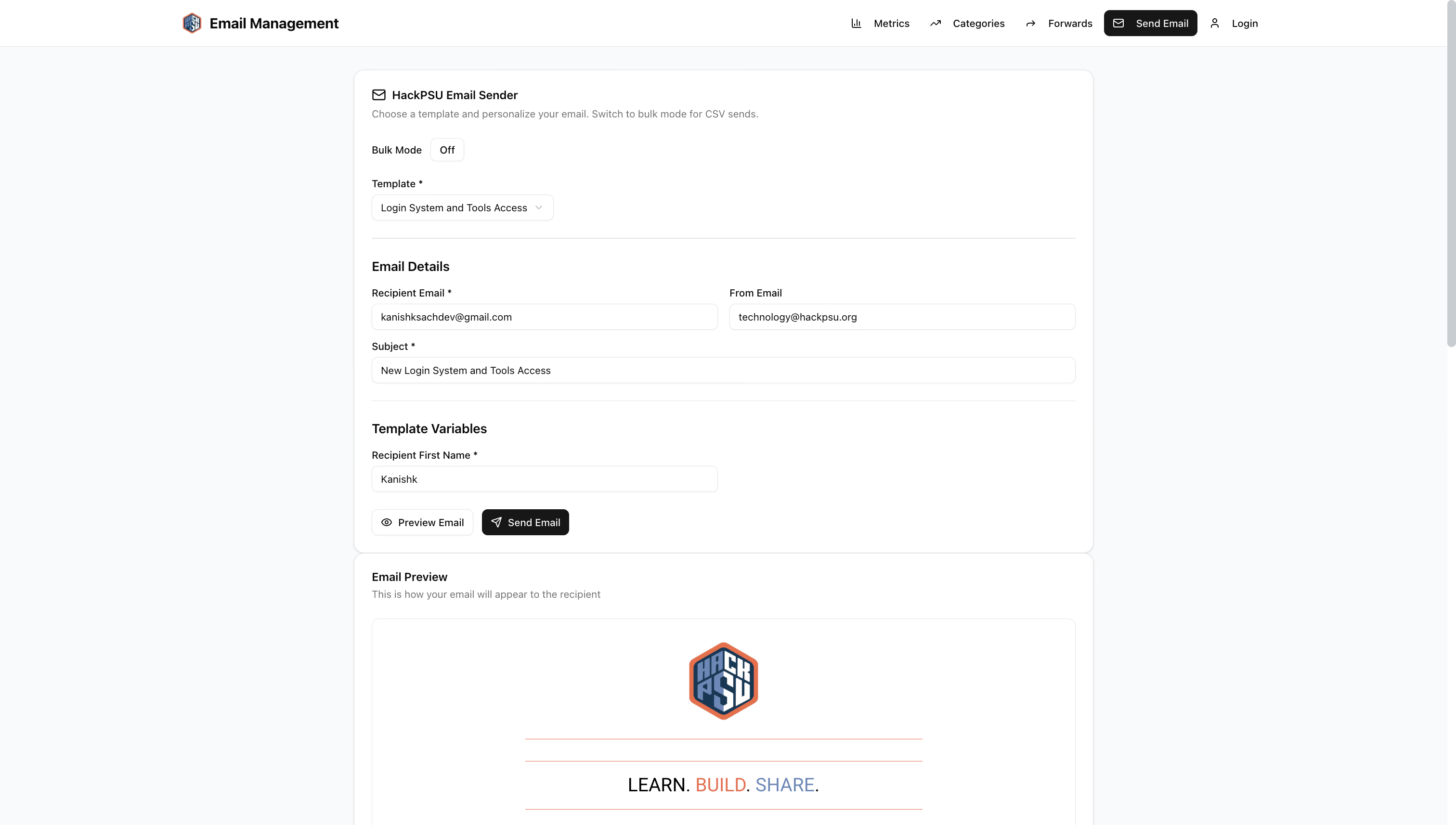
Templated email preview in the HackPSU email delivery system
I recently developed a feature that lets HackPSU organizers send templated emails in bulk, preview them on demand and track success or failure for every recipient. The existing tools were scattered, manual and error prone, so I set out to build:
a unified React form for single and bulk sends,
live previews powered by MJML and Handlebars,
a lightweight CSV parser with field validation,
a NestJS mail controller to handle preview and send endpoints,
a SendGrid service that pulls templates from Firebase Storage.
The Challenge: Templated Bulk Email on Existing Apps
HackPSU already had a working authentication system a bulk email feature needed to slot in without a full rewrite. Organizers had to upload HTML templates manually test them locally and copy‑paste to SendGrid UI, or write their own scripts. That led to broken layouts missing personalization fields and no easy way to retry failed sends.
Goal: Let an organizer pick a template, fill common variables, paste or upload a CSV of recipients and fields, preview one email on the spot, then send to everyone in one go with clear feedback on each address.
Designing the Flow
High-level flow of the email delivery system
I chose a clear separation between UI logic in React and delivery logic in NestJS so I could evolve either side independently.
1. React Form and Preview
I built a single EmailForm component that toggles between single‑send and bulk‑send modes. I used React Hook Form for validation and a tiny CSV parser to avoid heavy dependencies. The email for also has logic to dynamically generate fields based on the selected template, and applying the correct validation rules.
Custom claims guard these routes so only team members can preview or send.
3. SendGrid Service and MJML Templates
The core of email generation lives in SendGridService. It fetches the MJML template from Firebase Storage, injects variables with Handlebars, runs mjml2html and returns pure HTML.
I chose a simple sync loop so the UI shows progress in real time, and organizers get immediate feedback on which addresses failed.
Benefits and Learnings
Single code path, same templates for preview and send, ensures consistency.
Handlebars plus MJML lets me write rich responsive emails without manual inlining.
A minimal CSV parser avoids a heavy dependency, while handling our use case.
NestJS guards make sure only authenticated organizers can send or upload templates.
Real‑time feedback in the UI keeps users in control and reduces uncertainty.
Challenges and What’s Next
I ran into edge cases with large CSVs causing UI hangs, so I’d like to move to a paginated or queue‑based send where the browser offloads work. I also noticed some rate limits on SendGrid for rapid calls, so batching requests server‑side would help. Finally I want to add retry logic for transient failures and integrate delivery webhooks for open and click tracking.
From a user perspective, I’d like to add a history view so organizers can see past sends and their results. Also allow users to upload templates directly from the UI instead of Firebase Storage.
TL;DR
I built a React form for single and bulk templated email with live preview, backed by NestJS endpoints that fetch MJML templates from Firebase Storage, compile them with Handlebars and send via SendGrid. The system slots into our existing apps, keeps templates in one place, gives organizers clear feedback and paves the way for robust retry and analytics in the future.